
Canonical URL Not Working? 10 Reasons Why Google Chooses Another Page
Over the last few years, I have noticed the same pattern during technical SEO audits more and more often. A website appears to have a perfectly valid canonical tag. The SEO plugin shows no warning. The canonical URL is present in the source code. Everything looks correct at first glance.
And yet, Google Search Console shows the message many website owners and SEO specialists do not want to see:
Google chose different canonical than user
This can be frustrating because the canonical tag is often treated as a simple technical fix. You add the tag, point it to the preferred page, and expect Google to follow it. But in real-world SEO, it rarely works that cleanly anymore.
The problem is not always the canonical tag itself. In many cases, the real issue is that modern websites send too many conflicting signals. Filters, URL parameters, multilingual versions, JavaScript rendering, WooCommerce categories, AI-generated pages, pagination, and automated sitemap logic can all quietly tell Google different things about which page should be treated as the main one.
That is why canonical problems are no longer just a small SEO plugin setting. They are often a symptom of a deeper website architecture issue.
In this article, we will look at 10 common reasons why Google may ignore your canonical URL and choose another page instead.
What Is a Canonical URL?
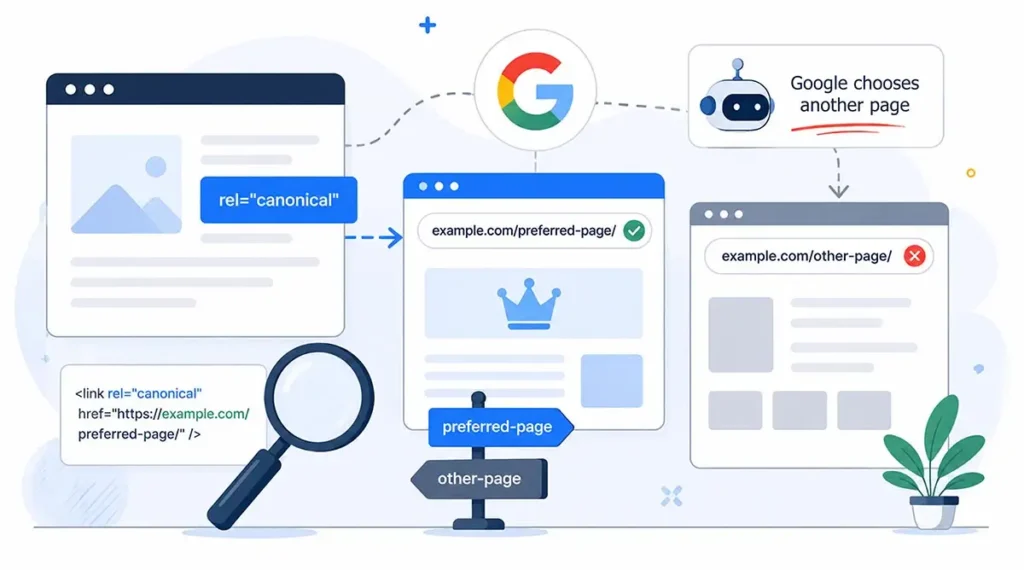
A canonical URL is a way to tell search engines which version of a page should be considered the preferred one when several similar URLs exist.
<link rel="canonical" href="https://example.com/page/" />Canonical tags are commonly used to manage duplicate or near-duplicate URLs created by tracking parameters, filtered category pages, sorting options, pagination, UTM tags, or technical URL variations.
However, the most important thing to understand is this: a canonical URL is not a directive. It is a hint. Google may follow it, but it may also decide that another URL is a better canonical version.
That decision depends on many signals: internal linking, sitemap consistency, page content, redirects, hreflang implementation, indexability, crawlability, and the overall architecture of the website.
Canonical tags rarely work well in isolation. If the rest of the website sends conflicting signals, Google may ignore the declared canonical even if the tag itself is technically correct. This is why canonical issues are often part of broader technical SEO problems. We explained this wider context in our article on the technical side of a website.
What Is a Canonical Issue?
There isn’t a single definition of a canonical issue because the same message in Google Search Console can be caused by completely different technical problems. Two websites may report identical canonical warnings, yet require entirely different fixes.
You might have a perfectly valid canonical tag, no HTML errors, and a page that looks technically correct. Then you open Search Console and discover that Google has selected a completely different URL as the canonical version. If that sounds familiar, you’ve already run into a canonical issue.
In my experience, the canonical tag itself is rarely the real culprit. More often, it is the rest of the website sending mixed messages. Internal links may favour one URL, the XML sitemap another, while hreflang tags, redirects, faceted navigation, or JavaScript-generated pages quietly add even more conflicting signals.
That is why fixing a canonical issue usually starts with a simple question: What is Google actually seeing that I’m not? Once you look beyond the HTML tag and examine the website as a whole, the reason often becomes much easier to understand.
10 Reasons Why Google Ignores Your Canonical URL
1. The Pages Are Not as Similar as You Think
One of the most common misconceptions about canonical URLs is that they can be used to merge any pages that look similar. In practice, Google is much stricter than many website owners expect.
Two pages may look almost identical to a human visitor. They may use the same template, the same header, the same sidebar, and the same general layout. But Google does not evaluate similarity only by design. It looks at the actual content, internal links, product sets, headings, structured data, and the purpose of the page.
A good example is a WooCommerce category page with filters. To the store owner, the filtered version may look like a technical variation of the main category. But if that page contains a different product selection, a slightly different intent, and different internal links, Google may treat it as a separate document.
For example, a general category page for “running shoes” and a filtered page for “black running shoes size 42” may use the same template. But they do not necessarily answer the same search need. The second page is more specific. In some cases, Google may even consider it more useful for a long-tail query than the parent category.
This is where canonical logic becomes complicated. From the website owner’s perspective, the filtered page is a duplicate. From Google’s perspective, it may be a page with its own search intent.
When pages are not close enough in content and purpose, Google may decide not to consolidate them, even if the canonical tag asks it to.
2. Internal Links Tell Google a Different Story
I often see this after redesigns, migrations, or changes in website structure. The canonical tag points to one URL, but the navigation, breadcrumbs, product links, related posts, and category links quietly point somewhere else.
During a quick audit, everything may look fine because the canonical tag is present. But Google does not look at that tag in isolation. It crawls the site and tries to understand which URLs the website itself treats as important.
For example, the canonical tag may point to:
https://example.com/category/But internal links across the website may repeatedly point to:
https://example.com/category/?orderby=priceIn that situation, Google receives two different messages. The canonical tag says one URL is preferred. The internal linking structure suggests another URL is actually being promoted by the website.
This becomes especially messy on e-commerce websites, where filters, sorting options, breadcrumbs, product widgets, and automatically generated blocks can create many internal links to parameter-based URLs.
A canonical tag cannot fully compensate for poor internal linking logic. If the site architecture consistently points Google to one version of a page, while the canonical tag points to another, Google may choose the URL supported by stronger internal signals.
That is why canonical audits should always include internal linking analysis. Looking only at the source code is not enough.
3. Canonical and Hreflang Tags Conflict
Multilingual websites create a separate group of canonical problems. This is very common on WordPress websites using plugins such as WPML, Polylang, TranslatePress, or custom multilingual implementations.
A typical mistake is when all language versions point their canonical tags to the default language version.
For example, the English page, Ukrainian page, and German page all declare the English URL as canonical. At the same time, hreflang tells Google that these pages are language alternatives.
That creates a conflict. Hreflang says: “These are separate language versions.” Canonical says: “Only one of them is the main page.”
In most cases, each language version should have a self-referencing canonical tag, while hreflang should connect the alternative language versions.
If this logic is broken, Google may ignore canonical tags, ignore hreflang tags, or index the wrong language version.
4. Filters and URL Parameters Create Too Many Variations
Modern e-commerce websites often generate many URL variations through filters, sorting options, tracking parameters, product attributes, stock status, and pagination.
Examples include:
?filter_color=black
?orderby=price
?filter_brand=nike
?stock=instock
From the website owner’s perspective, these may look like technical URLs. But Google may see them differently.
If a filtered page contains a useful product selection, has internal links, receives impressions, or matches a more specific search query, Google may decide that it has independent value.
This is one of the reasons canonical tags in faceted navigation are difficult. Some filtered URLs should be blocked, some should be canonicalized, and some may deserve their own indexable landing pages.
E-commerce SEO often depends on this distinction. A large store can lose significant organic visibility if filters, categories, pagination, and canonical tags are handled mechanically. We covered related issues in our guide to e-commerce SEO optimization.
5. Google Sees the Page as a Soft Duplicate
A soft duplicate is not an exact copy. It is a page that is different enough to exist, but similar enough for Google to group it with other pages.
This often happens with city landing pages, service pages, category variations, product variations, or AI-generated SEO pages.
For example, a website may create dozens of pages using the same structure:
- service + city;
- product + brand;
- industry + solution;
- website development + business niche.
The text may be rewritten, but the intent, layout, headings, and overall value may remain very similar.
Google is increasingly good at recognizing these patterns. In such cases, it may group similar pages and choose its own canonical version, even if every page declares itself as canonical.
6. The Canonical URL Points to a Page Google Does Not Trust
Sometimes the declared canonical page is technically present, but it is not a good candidate for consolidation. This is a very common issue after website migrations, deleted products, category restructuring, HTTPS changes, or plugin updates.
For example, the canonical tag may point to a URL that redirects somewhere else. Or it may point to a page that has a noindex tag, returns a 404 error, is blocked by robots.txt, loads very slowly, or is barely linked internally.
From a human perspective, this may look like a small technical inconsistency. From Google’s perspective, it raises a question: why should this URL be treated as the main version if the website itself does not make it accessible, indexable, or important?
This happens more often than people expect. A product is removed, but its old canonical remains in templates. A category slug changes, but some pages still reference the previous URL. A staging or parameter-based version accidentally becomes part of the canonical logic. The tag is there, but the destination is weak or unreliable.
When Google cannot confidently use the declared canonical page, it may look at the rest of the URL cluster and choose another page that appears cleaner, more stable, or more useful.
That is why every canonical audit should check not only whether the tag exists, but also whether the canonical destination returns a clean 200 status code, is indexable, receives internal links, and actually deserves to be treated as the main page.
7. The XML Sitemap Sends a Conflicting Signal
An XML sitemap is often treated as a background technical file that nobody looks at unless something breaks. In reality, it is one of the ways a website tells Google which URLs are important enough to be discovered and indexed.
Problems start when the sitemap and canonical tags do not agree with each other.
For example, a page may declare a clean canonical URL, while the XML sitemap still includes old URLs, URLs with parameters, paginated URLs, or filtered category pages. This is especially common on WordPress and WooCommerce websites where one plugin manages SEO settings, another plugin creates filters, and a third plugin modifies product or category URLs.
Google then receives a mixed message. The canonical tag says: “This is the preferred URL.” The sitemap says: “Please crawl and index these other URLs too.”
This does not automatically mean Google will ignore the canonical tag. But it makes the signal less clean. If the same conflict appears across many pages, Google may start making its own decisions about which URLs should represent each content group.
I would not treat sitemap checks as optional anymore. On a modern website, especially an e-commerce website, the sitemap should be compared against canonical tags, indexability, internal links, and actual crawl behavior.
The goal is simple: the URLs you declare as canonical should also be the URLs you include in the sitemap and support through internal linking. If these signals are aligned, Google has much less reason to choose a different page.
8. The Canonical Tag Is Generated Too Late by JavaScript
JavaScript-heavy websites created a new category of canonical problems.
On React, Vue, Angular, SPA, or headless CMS websites, canonical tags may be injected dynamically after the page loads. In some cases, the canonical tag may change after rendering or depend on client-side routing.
This can create problems for crawling and indexing.
Google can render JavaScript, but rendering is not always immediate, and it is not the same as receiving clean HTML from the server. If the canonical tag appears too late or changes after the initial HTML response, Google may not treat it as reliably as a server-rendered canonical.
For important SEO pages, canonical tags should ideally be present in the initial HTML response. This is especially important for websites with large numbers of pages, frequent changes, or limited crawl budget.
9. AI-Generated Pages Create New Duplicate Content Patterns
AI-generated content has made canonical problems more common, not less.
Many websites now generate large numbers of SEO pages for locations, services, product variations, industries, or long-tail queries. These pages may be technically unique, but they often follow the same structure and provide very similar value.
Google may not treat them as exact duplicates. But it may still cluster them, ignore some of them, or choose a different canonical version than the one declared by the site.
This is why simply rewriting content is not enough. Pages need to be meaningfully different in search intent, structure, internal linking, examples, data, and usefulness.
If dozens of pages exist only because keywords were slightly changed, canonical tags will not solve the underlying quality problem.
10. Google Simply Disagrees With Your Choice
This is the most frustrating reason, but it is also one of the most important.
Google does not have to follow your canonical tag. It can choose another URL if its systems believe that another page is a better representative of the content cluster.
Google may prefer another page because it has stronger internal links, more external links, better content, cleaner URL structure, higher relevance, better crawl signals, or more consistent inclusion in the sitemap.
In other words, the canonical tag is only one vote. If many other signals vote for another URL, Google may choose that URL instead.
This is why canonical problems often appear together with ranking drops, indexing instability, or unexpected changes in search visibility. Sometimes the website is not “penalized” — Google is simply consolidating signals differently than expected. We discussed similar technical and structural issues in the article on why a website may lose search rankings.
How to Check Whether Google Accepted Your Canonical URL
The most reliable place to check canonical status is Google Search Console.
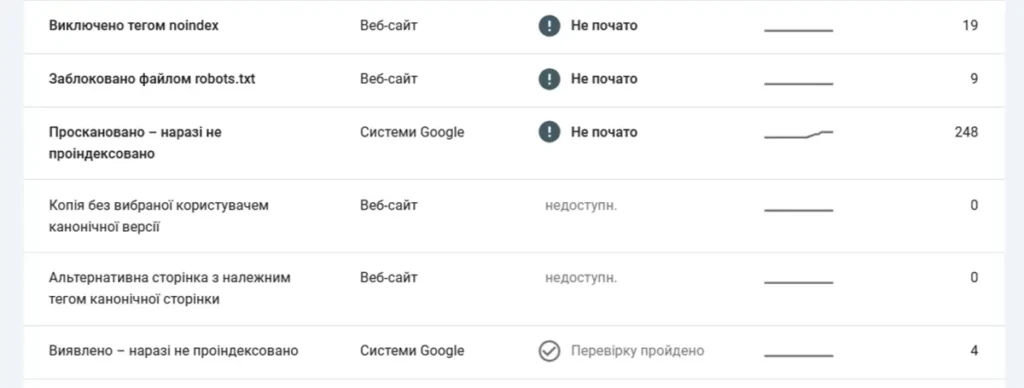 Google Search Console helps identify indexing and URL selection issues that may influence how Google chooses canonical pages
Use the URL Inspection Tool and compare two values:
- User-declared canonical — the canonical URL declared by your website;
- Google-selected canonical — the canonical URL actually chosen by Google.
If these values are different, Google ignored your declared canonical and selected another URL.
When that happens, do not look only at the canonical tag. Check the whole signal set:
- whether the canonical URL is indexable and returns a 200 status code;
- whether internal links point to the canonical version;
- whether the XML sitemap contains only canonical URLs;
- whether hreflang tags are consistent;
- whether URL parameters create unnecessary duplicates;
- whether the page is blocked, redirected, or marked as noindex;
- whether JavaScript changes the canonical after rendering.
For deeper analysis, tools such as Screaming Frog, Sitebulb, Ahrefs, Semrush, or JetOctopus can help compare canonical tags, status codes, indexability, internal links, and sitemap data at scale.
Final Thoughts
Canonical URLs are still important, but they should not be treated as a magic tag that fixes every duplicate content problem. On older, simpler websites, canonical logic was often easier to manage. On modern websites, it has become part of a much bigger system.
A typical website today may have filtered category pages, multilingual versions, JavaScript-rendered content, AI-generated landing pages, URL parameters, pagination, automated sitemaps, and several plugins or modules all modifying URLs in their own way.
In that environment, Google does not look at the canonical tag alone. It compares the declared canonical with the rest of the website: internal links, sitemap entries, hreflang tags, redirects, indexability, content similarity, crawl signals, and page quality.
If all these signals support the same URL, Google has a clear reason to trust your canonical choice. But if every part of the website tells a slightly different story, Google may choose the page that makes the most sense from its own perspective.
That is why canonical issues should be handled as website architecture issues, not just SEO plugin settings.
A reliable canonical setup starts with clean URL structure, consistent internal linking, correct sitemap logic, properly implemented hreflang, indexable destination pages, and content that clearly explains why one page should be treated as the main version.
In other words, the canonical tag should confirm the logic of the website, not try to repair it after everything else has already become inconsistent.
